

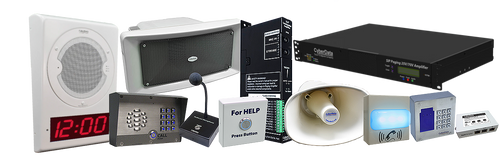


**NEW PRODUCT** 011601 InformaCast Enabled SIP Paging Server +
Part Number: 011601
MSRP: $469.00
- Description
- Features
- Specs
- FAQs
- Installation
- Downloads
The InformaCast Enabled SIP Paging Server + enables the use of 100 zones for paging and bell scheduling through a single SIP extension on a VoIP Phone system in addition to supporting Singlewire InformaCast's paging and emergency notification software. The built-in calendar-based bell scheduler allows configuration of scheduled bells or messages through a secure web interface to be sent to the 100 multicast zones. The unit also features DTMF passthrough to seamlessly integrate with analog or legacy paging amplifiers. The Paging Server + allows for both sending and receiving multicast in standard and Poly formats including all channels.
Perfect for schools, universities, manufacturing or any environment where scheduled bells and zone paging are paramount.
CyberData's SIP enabled VoIP products are compatible with a vast majority of VoIP systems including SBCs, Gateways, and phone systems both on-premise or cloud-based.
- Supports sending lnformaCast pages to multicast endpoints
- Can send or receive pages directly from Poly phones as well as other devices that can send standard multicast
- Supports Two-Factor Authentication
- DTMF entries for analog paging zones
- Over a GB of available space for user uploaded audio: up to 135 files for stored messages, bells, and other audio created by the user
- Calendar-based bell scheduler supporting multiple schedule files and time-based recurring event management
- Supports call-in stored message recording
- Voice prompting and password controlled zones
- Supports 100 paging groups accessed via DTMF
- Paging Prioritization
- Loud/Night Ringer function - second SIP extension
- Supports user-uploadable ring and alert tones, with the option to send a stored message with each of the 100 page groups
- Supports delayed pages, i.e. call buffering
- Support for security code to prevent unwanted SIP calls
- Supports multiple user accounts, with distinct log in credentials
- Can send or receive multicast on any Poly channel
- Fault sense input
- Line-in for background music
- Line-out connector
- NTP-based internal clock
- Audio-controlled onboard relay for amplifier mute control
- Rack mountable
- TLS 1.2 and SRTP enhanced security for IP Endpoints in a local or cloud-based environment
- HTTP command interface
- HTTPS web based configuration
- Support for Cisco SRST resiliency
- Autoprovisioning via HTTPS, HTTP or TFTP
- 802.11q VLAN tagging
| Ethernet I/F | 10/100 Mbps |
| Protocol | SIP RFC 3261 Compatible InformaCast® v 4.0 or above |
| Power Input | PoE 802.3af or 48VDC (not included) |
|
Line In: Input Signal Amplitudes Input Impedance |
2.0 VPP Maximum 10k Ohm |
|
Line Out: Output Signal Amplitudes Output Level Total Harmonic Distortion Output Impedance |
2.0 VPP Maximum +2dBm nominal 0.5% maximum 10k Ohm |
| Page Port Output | Balanced 600 Ohm 5VPP |
| Payload Types | G.711 a-law, G.711 μ-law, G.722 and G.729 |
| Network Security | TLS 1.2, SRTP, HTTPS |
| Operating Range | Temperature: -40 degrees C to 55 degrees C (-40 degrees F to 131 degrees F) Humidity: 5-95%, non-condensing |
| Storage Temperature | -40 degrees C to 70 degrees C (-40 degrees F to 158 degrees F) |
| Storage Altitude | Up to 15,000 ft. (4573 m) |
| Dimensions* |
Length: 6.11 inches [155.19 mm] Width: 4.05 inches [102.87 mm] Height: 1.15 inches [29.21 mm] |
|
Weight Boxed Weight |
1.2 lbs. [0.54 kg] 1.8 lbs. [0.82 kg] |
| Compliance | CE: EMC Directive – Class A EN 55032 & EN 55024, LV Safety Directive – EN 62368-1; RoHS Compliant; FCC Part 15 Class A; Industry Canada ICES-3 Class A; IEEE 802.3 Compliant; TAA Compliant |
| Warranty | 5 Years Limited |
| Part Number | 011601 |
*Dimensions are measured from the perspective of the product being upright with the front of the product facing you.
How do I update my firmware?
Download the firmware for your device from the Downloads section. To update the firmware, unzip the file and log in to the web GUI for the device you are trying to upgrade. Navigate to the Firmware tab and browse for the firmware file you just downloaded. Select and upload that file. Do not reboot, the device will do it for you. For more information, please check your product’s Operations Guide, also available under the Downloads tab.
PLEASE NOTE: Firmware is not backwards compatible for legacy devices. If you are downgrading or trying to update a legacy device, please contact CyberData’s Technical Support Department first to ensure the device does not get damaged. We also recommend you export a copy of your current configuration BEFORE updating, should a loss of power or another issue occur that would potentially lose your settings. Additionally, if you are unable to find firmware for your device, please contact CyberData’s Technical Support Department with your device's serial number and we can provide the firmware.
Is this device compatible with my service provider or IP-PBX server?
CyberData VoIP products are compatible with IP-PBX servers that support standard SIP protocol. You can find a full list of IP-PBX servers that CyberData products have been validated on by going to Connecting to Compatible IP-PBX Servers. If you do not see your IP-PBX on this list, feel free to contact CyberData’s Technical Support Department for more information.
Is this device compatible with my analog amplifier?
Our page, Connecting to Compatible Analog Amplifiers, portrays a list of third party analog amplifiers that CyberData has validated compatibility. If you do not see your amplifier on the list, please contact CyberData’s Technical Support Department.
How does this product support 100 zones?
The CyberData Paging Server can send out multicast onto the local subnet by dialing the device and choosing one of the zones (0-99). The recipient will need to be multicast capable, on the same subnet as the Paging Server and configured to receive the stream by providing it the unique multicast address and port number that the audio will be streamed through.
What is multicast?
IP multicast is a technique for one-to-many communication over a local IP network. IGMP multicast is sent via UDP packets from a multicast server to a multicast receiver. This stream scales to a larger receiver population by not requiring prior knowledge of who or how many receivers there are. Multicast uses network infrastructure efficiently by requiring the source to send a packet only once, even if it needs to be delivered to many receivers. The network replicates the packet in order to reach multiple receivers only when necessary.
Multicast is a great alternative to SIP registration as it does not require that the recipient of the stream to register as an extension on an IP-PBX server.
CyberData products support both regular IGMP multicast as well as proprietary Polycom Group Paging.
For additional support or answers to questions not covered on this page, who should I contact?
How many users can the SIP Paging Server + support?
There is currently no limit to the number of users.
How many Poly channels can the paging server page to?
The paging server's page groups (PGroups) can be set to page to a specific channel. This allows for each PGroup to page to a different channel.
How many schedules can the paging server support?
There is no limit. Schedules are now stored on the unit itself, no need to manage schedule files separately on a computer.
Typical Installation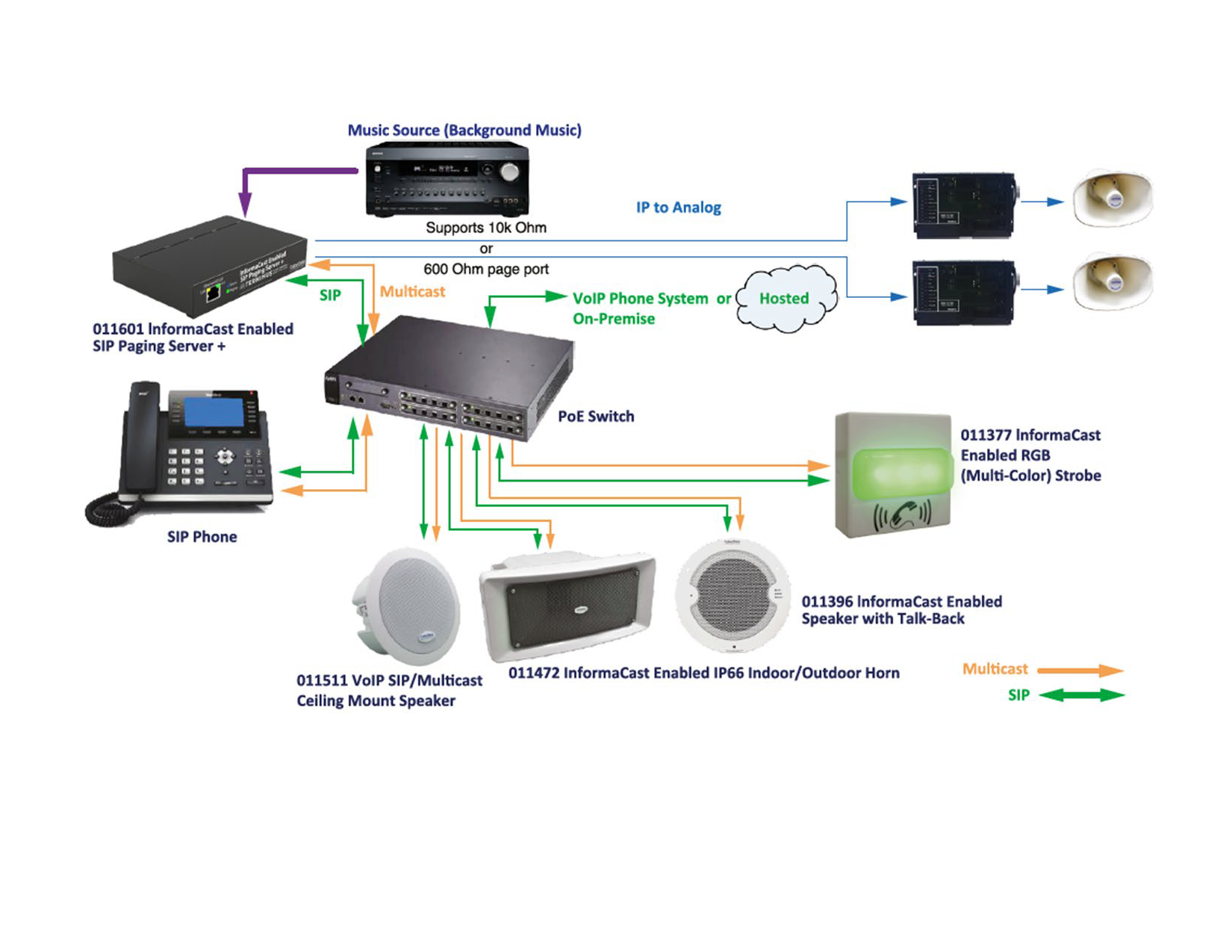
Typical School Use Case 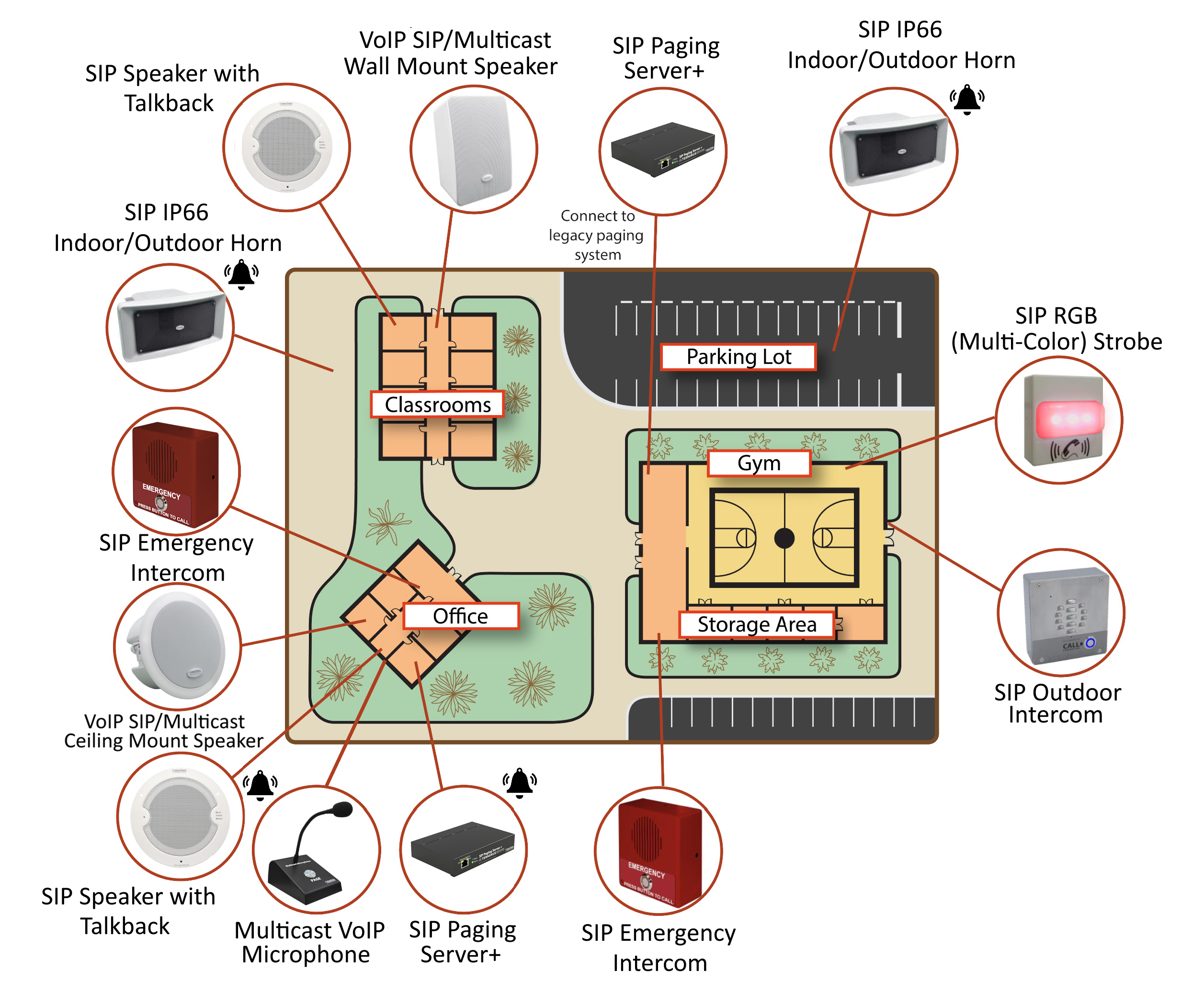
Dimensions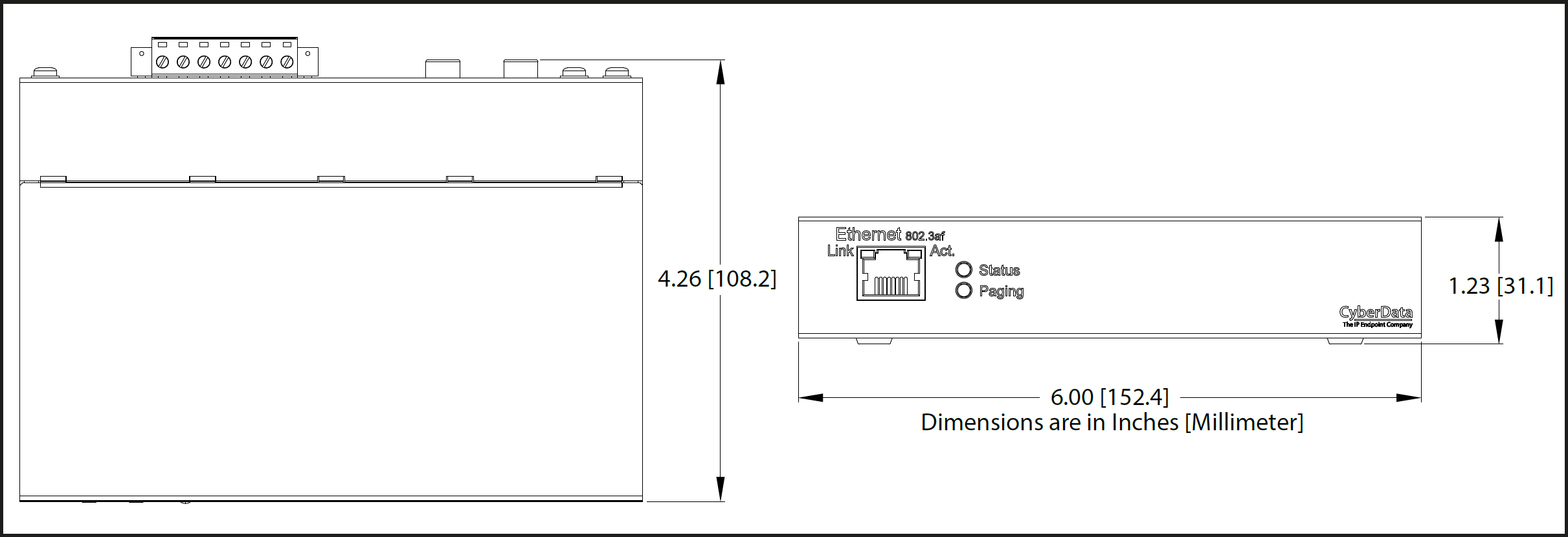
Connections 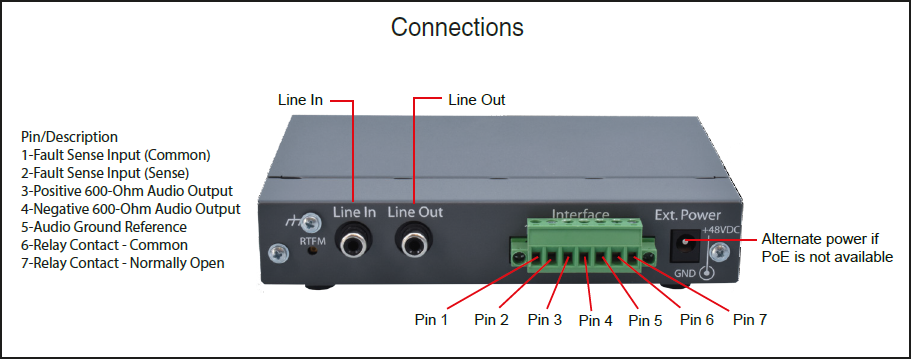
All firmware files include release notes and an autoprovisioning template.
Please back up your configuration before uploading firmware, and restore factory defaults after the upload is complete.
| Bell Scheduler | |
|---|---|
| Description | Date |
| FIRST: Register your device | - |
| User Uploadable Bells | - |
| Documentation | |
| Description | Date |
| PDF Datasheet | DATE:7/25/26 |
| PDF Quick Start Guide | DATE:2/10/25 |
| PDF Quick-Reference Placemat | DATE:7/25/26 |
| PDF Operations Guide (firmware version 23.1) | DATE:7/20/26 |
| PDF CyberData Night Ringer Explained | DATE:3/25/20 |
| Firmware, Drivers & Utilities | |
| ZIP The Discovery Utility scans the network for any CyberData devices. | |
Description
The InformaCast Enabled SIP Paging Server + enables the use of 100 zones for paging and bell scheduling through a single SIP extension on a VoIP Phone system in addition to supporting Singlewire InformaCast's paging and emergency notification software. The built-in calendar-based bell scheduler allows configuration of scheduled bells or messages through a secure web interface to be sent to the 100 multicast zones. The unit also features DTMF passthrough to seamlessly integrate with analog or legacy paging amplifiers. The Paging Server + allows for both sending and receiving multicast in standard and Poly formats including all channels.
Perfect for schools, universities, manufacturing or any environment where scheduled bells and zone paging are paramount.
CyberData's SIP enabled VoIP products are compatible with a vast majority of VoIP systems including SBCs, Gateways, and phone systems both on-premise or cloud-based.
Features
- Supports sending lnformaCast pages to multicast endpoints
- Can send or receive pages directly from Poly phones as well as other devices that can send standard multicast
- Supports Two-Factor Authentication
- DTMF entries for analog paging zones
- Over a GB of available space for user uploaded audio: up to 135 files for stored messages, bells, and other audio created by the user
- Calendar-based bell scheduler supporting multiple schedule files and time-based recurring event management
- Supports call-in stored message recording
- Voice prompting and password controlled zones
- Supports 100 paging groups accessed via DTMF
- Paging Prioritization
- Loud/Night Ringer function - second SIP extension
- Supports user-uploadable ring and alert tones, with the option to send a stored message with each of the 100 page groups
- Supports delayed pages, i.e. call buffering
- Support for security code to prevent unwanted SIP calls
- Supports multiple user accounts, with distinct log in credentials
- Can send or receive multicast on any Poly channel
- Fault sense input
- Line-in for background music
- Line-out connector
- NTP-based internal clock
- Audio-controlled onboard relay for amplifier mute control
- Rack mountable
- TLS 1.2 and SRTP enhanced security for IP Endpoints in a local or cloud-based environment
- HTTP command interface
- HTTPS web based configuration
- Support for Cisco SRST resiliency
- Autoprovisioning via HTTPS, HTTP or TFTP
- 802.11q VLAN tagging
Specs
| Ethernet I/F | 10/100 Mbps |
| Protocol | SIP RFC 3261 Compatible InformaCast® v 4.0 or above |
| Power Input | PoE 802.3af or 48VDC (not included) |
|
Line In: Input Signal Amplitudes Input Impedance |
2.0 VPP Maximum 10k Ohm |
|
Line Out: Output Signal Amplitudes Output Level Total Harmonic Distortion Output Impedance |
2.0 VPP Maximum +2dBm nominal 0.5% maximum 10k Ohm |
| Page Port Output | Balanced 600 Ohm 5VPP |
| Payload Types | G.711 a-law, G.711 μ-law, G.722 and G.729 |
| Network Security | TLS 1.2, SRTP, HTTPS |
| Operating Range | Temperature: -40 degrees C to 55 degrees C (-40 degrees F to 131 degrees F) Humidity: 5-95%, non-condensing |
| Storage Temperature | -40 degrees C to 70 degrees C (-40 degrees F to 158 degrees F) |
| Storage Altitude | Up to 15,000 ft. (4573 m) |
| Dimensions* |
Length: 6.11 inches [155.19 mm] Width: 4.05 inches [102.87 mm] Height: 1.15 inches [29.21 mm] |
|
Weight Boxed Weight |
1.2 lbs. [0.54 kg] 1.8 lbs. [0.82 kg] |
| Compliance | CE: EMC Directive – Class A EN 55032 & EN 55024, LV Safety Directive – EN 62368-1; RoHS Compliant; FCC Part 15 Class A; Industry Canada ICES-3 Class A; IEEE 802.3 Compliant; TAA Compliant |
| Warranty | 5 Years Limited |
| Part Number | 011601 |
*Dimensions are measured from the perspective of the product being upright with the front of the product facing you.
FAQs
How do I update my firmware?
Download the firmware for your device from the Downloads section. To update the firmware, unzip the file and log in to the web GUI for the device you are trying to upgrade. Navigate to the Firmware tab and browse for the firmware file you just downloaded. Select and upload that file. Do not reboot, the device will do it for you. For more information, please check your product’s Operations Guide, also available under the Downloads tab.
PLEASE NOTE: Firmware is not backwards compatible for legacy devices. If you are downgrading or trying to update a legacy device, please contact CyberData’s Technical Support Department first to ensure the device does not get damaged. We also recommend you export a copy of your current configuration BEFORE updating, should a loss of power or another issue occur that would potentially lose your settings. Additionally, if you are unable to find firmware for your device, please contact CyberData’s Technical Support Department with your device's serial number and we can provide the firmware.
Is this device compatible with my service provider or IP-PBX server?
CyberData VoIP products are compatible with IP-PBX servers that support standard SIP protocol. You can find a full list of IP-PBX servers that CyberData products have been validated on by going to Connecting to Compatible IP-PBX Servers. If you do not see your IP-PBX on this list, feel free to contact CyberData’s Technical Support Department for more information.
Is this device compatible with my analog amplifier?
Our page, Connecting to Compatible Analog Amplifiers, portrays a list of third party analog amplifiers that CyberData has validated compatibility. If you do not see your amplifier on the list, please contact CyberData’s Technical Support Department.
How does this product support 100 zones?
The CyberData Paging Server can send out multicast onto the local subnet by dialing the device and choosing one of the zones (0-99). The recipient will need to be multicast capable, on the same subnet as the Paging Server and configured to receive the stream by providing it the unique multicast address and port number that the audio will be streamed through.
What is multicast?
IP multicast is a technique for one-to-many communication over a local IP network. IGMP multicast is sent via UDP packets from a multicast server to a multicast receiver. This stream scales to a larger receiver population by not requiring prior knowledge of who or how many receivers there are. Multicast uses network infrastructure efficiently by requiring the source to send a packet only once, even if it needs to be delivered to many receivers. The network replicates the packet in order to reach multiple receivers only when necessary.
Multicast is a great alternative to SIP registration as it does not require that the recipient of the stream to register as an extension on an IP-PBX server.
CyberData products support both regular IGMP multicast as well as proprietary Polycom Group Paging.
For additional support or answers to questions not covered on this page, who should I contact?
How many users can the SIP Paging Server + support?
There is currently no limit to the number of users.
How many Poly channels can the paging server page to?
The paging server's page groups (PGroups) can be set to page to a specific channel. This allows for each PGroup to page to a different channel.
How many schedules can the paging server support?
There is no limit. Schedules are now stored on the unit itself, no need to manage schedule files separately on a computer.
Installation
Typical Installation
Typical School Use Case
Dimensions
Connections
Downloads
All firmware files include release notes and an autoprovisioning template.
Please back up your configuration before uploading firmware, and restore factory defaults after the upload is complete.
| Bell Scheduler | |
|---|---|
| Description | Date |
| FIRST: Register your device | - |
| User Uploadable Bells | - |
| Documentation | |
| Description | Date |
| PDF Datasheet | DATE:7/25/26 |
| PDF Quick Start Guide | DATE:2/10/25 |
| PDF Quick-Reference Placemat | DATE:7/25/26 |
| PDF Operations Guide (firmware version 23.1) | DATE:7/20/26 |
| PDF CyberData Night Ringer Explained | DATE:3/25/20 |
| Firmware, Drivers & Utilities | |
| ZIP The Discovery Utility scans the network for any CyberData devices. | |